Appearance
Updates
Q1 2026
We've not been resting on our laurels since the last update and have been busy working on some fantastic new features and improvements to make your event management experience even better. Here's a sneak peek at what we've launched in the first quarter of 2026:
Payment Plans
- Deposit & Single Balance Instalment Option: Event organisers can now specify if a payment plan just requires a deposit and one, single balancing payment at a later date, rather than multiple instalments, with the ability to set the due date for this balancing payment. This is a great option for events that want to offer a simple payment plan without the need for multiple instalments.
- Allow specific payment options for instalments: Event organisers can now specify which payment options they want to allow for each payment plan if different to the those generally avilable for those paying in full. For example, they may want to only allow card payments for Payment Plans, whereas those paying in full can choose to pay by card or BACs.
Tickets & Extras
Box Office vs Frontend Sales
We've added a new option to specify if an item should be for sale in the Box Office, the frontend booking process or both. This is a great way to have more control over where your tickets and extras are available for purchase. For example, you may want to have certain items that are only available for purchase in the Box Office and not on the frontend, or vice versa.
Extras Sets
Extras can now belong to 'sets', just like Tickets. This is a great way for you to report on and see within the event dashboard how many extras of a particular type have been sold. For example, you could have a set for 'Meal Extras' and then have different meal options within that set. This allows you to easily see how many meal extras have been sold in total as well as breaking it down by each meal option.
Team Member Management
Separate Email for Team Member Management Communications
We've added a new field to event settings to allow a different email address to be provided specifically for team member management. If provided, all team member related notifications sent to applicants will be addressed from this email address and any replies to those emails will go to this email address. This is a great way to keep team member management communications separate from other event communications.
Approve Team Members with Outstanding Criteria
An additional quality of life improvement alsoallows an event organiser to approve an application even if not all approval criteria have been met. Approving a team member under these conditions automatically flags the ticket to make it clear there are still outstanding criteria to be met for that team member.
Front of House
A small but mighty update here now shows all In Progress and Pending orders within the arrivals area with a clear warning that they aren't yet fully paid. This is a great way to ensure your front of house team are aware of any bookings that may not yet be fully paid and therefore may require extra attention when they arrive at the event.
3rd Party Platform Integrations
We've been busy building out a range of integrations with popular third-party platforms, such as CRM systems and email marketing tools, to allow event organisers to connect their Solidrock data with other systems they use. The first batch of these integrations are now available. Check out the Integrations & API section of the guide for more details on the available integrations and how to set them up.
API
Solidrock's public REST API is now available for use by event organisers, with comprehensive documentation and support for authentication, allowing for integration with other systems and custom development. The API documentation can be found at https://events.solidrock.io/docs/api and provides detailed information on the available endpoints, request and response formats, and examples of how to use the API.
Q4 2025
The final part of 2025 sees some fantastic updates to payment plans, re-using ticket data, digital ticket passes and more.
Payment Plans
- Automatic instalment retries: If a payment plan instalment fails to be automatically collected on the due date, we will now automatically retry collecting that instalment after 3 days and then 5 days from the initial failure. This is a great way to ensure you get paid without having to chase up your attendees for missed payments.
- Instlament amount automatic updates: If an event organiser updates an order resulting in the total amount changing, we will now automatically update the amount for any existing instalments that haven't yet been paid to capture this new balance. This is a great way to ensure that your payment plans always reflect the correct amount without having to manually update each instalment.
Re-using Ticket Data
Lead Bookers can now choose to re-use the details from tickets they have previously purchased for new orders. This is a great time saver for Lead Bookers who are purchasing multiple tickets across multiple orders or events, as they can simply select to re-use the details from a previous ticket and then just update any details that are different for the new ticket.
Digital Ticket Passes
Purchased tickets can now be saved as event passes to Apple and Google digital wallets. This is a great way for attendees to keep their tickets handy on their mobile devices and have a seamless arrivals experience at the event.
Ticket & Extra Collections
Events can now put their tickets and extras into 'collections' to allow for better organisation and grouping within frontend booking pages. For example, you could group all 'Day Tickets' together and all 'Camping Extras' together. This is a great way to make it easier for your attendees to find the tickets and extras they are looking for when booking without needing to scan through a long list of items.
Quality of Life Improvements & Bug Fixes
- Added Reference actions to the reference details page to allow you to easily modify the reference status in-situ without needing to go back to the list page to do so.
- A heap of bug fixes and performance improvements to make the system faster and more reliable for everyone.
Q3 2025
As Summer draws to an end in the Northern Hemisphere and Spring is in the air in the Southern Hemisphere, we're excited to share some fantastic updates that will enhance your event management experience. We've been hard at work listening to your feedback and implementing new features to make your life easier. Let's take a look at what's new!
Front of House
A number of significant updates have come to Front of House, including:
- Dashboard: A brand new dashboard has been added to Front of House, providing a live feed of arrivals and check-ins for your event, as well as key metrics and data visualisations to help you keep your finger on the pulse of how your event is progressing.
- Front of House User Accounts: We've added the ability to create dedicated Front of House user accounts that can be restricted to access only specific areas of Front of House, for example just check-in pages or just arrivals pages or just the Box Office. This allows you to give your front of house team access to the tools they need without giving them access to other areas of the system that they don't need.
- Customiseable Arrivals Search Result data: Event organisers can now specify other custom field data to be included on arrivals and person lookup pages, allowing you to have key information about your attendees at your fingertips when checking people in such as dietary requirements, emegency contact details and more.
- Extras in Arrivals: We've added the ability to see any extras that are part of a booking within the arrivals area, making it easier to manage arrivals for bookings with extras and ensuring you have all the information you need in one place.
- At Event Activity Log: We've added the ability to make comments against a ticket within the Front of House system, which are then recorded in an 'At Event Activity Log' for that ticket. This is a great way to keep track of any important information or incidents related to that ticket during the event.
Ticket Watchlist
Event organisers can now add tickets to a 'watchlist' that will automatically flag and notify event organisers if someone books in with matching details. This is a great way to keep an eye on any tickets that may be of concern for your event.
Group Flagging
Event Organisers can now enable auto-flagging for groups that are either not meeting the minimum adult to child ratios as configured, or if any groups contain only adults which may be of concern for events that are particularly catering to children and families. This allows you to easily identify and keep track of any groups that may be of concern within your event.
Places
We've added the ability to allocate groups, orders and tickets to specific areas/zones/villages within your event. This is a great way to keep track of where different groups and attendees are located within your event, and can be especially useful for larger events with multiple areas or zones.
Including a new report, you can now easily see which groups and how many tickets and extras are allocated to each place, helping you to manage capacity and logistics within your event.
Q2 2025
As we move into the second quarter of 2025, we're excited to share some fantastic updates that will enhance your event management experience. We've been hard at work listening to your feedback and implementing new features to make your life easier. Let's take a look at what's new!
Stripe
We've refactored and updated our Stripe integrations to use the latest Stripe API and payment elements. This update brings a host of improvements, including:
- Improved Payment Experience: The new Stripe integration provides a more seamless and user-friendly payment experience for your attendees.
- More Payment Methods: The latest Stripe Payment Elements support a wider range of payment methods, allowing your attendees to pay using their preferred method including Apple Pay and Google Pay as well as providing the option for them to save multiple card details for future use.
- Enhanced Security: The latest Stripe API offers improved security features to protect your payment data.
Linking Extras to Tickets
We've improved the ticket linking feature for extras. Now, when an extra is added to an order that requires some custom data a Lead Booker can link it to any ticket across any order they've placed for the same event.
In addition we've added a new setting for Extras to alow you to specificy if the extra is required to be linked to a ticket or not. This is useful for extras, such as meal vouchers, that should always be associated with a particular person. A Lead Booker will not be able to complete their order until they have linked the extra(s) to a ticket with this setting enabled.
Groups
Group Coordinator Ticket Status Visibility
Group Coordinators now have a little more visibility over the status of the tickets and extras assigned to their group. They can now see at a glance if a ticket or extra is paid or unpaid, and how complete the ticket data is:
- Unassigned: No ticket data has been provided for this ticket
- Partially Assigned: Some ticket data has been provided for this ticket but some required data remains incomplete.
- Fully Assigned: All required ticket data has been provided for this ticket
🎟️ Group Coordinator Access to Download All Tickets 🎟️
Event Organisers now have the ability to enable or disable the option for Group Coordinators to download all tickets for their group members. This is a great way to streamline the ticket distribution process and ensure that all group members have access to their tickets especially for larger groups or those where tickets are purchased by many different individuals.
Reports
We've made some improvements to the reports available:
- Date Columns: The output format for these columns has been updated to be more consistent across all reports and to work more reliably with various spreadsheet software, such as Excel, Google Sheets & Apple Numbers, to be automatically recognised as Dates and therefore be instantly sortable.
- Custom Form Data: Columns related to custom form data have now been ordered according to the order those fields are present within the forms. This makes it easier to read and understand the data being presented in the reports.
Q1 2025
We're kicking off the new year with a bang, bringing you a host of exciting updates and improvements to enhance your event management experience. Let's take a look at some of the huge features we've been working on!
🎁 Bundles! 🎁
We're thrilled to introduce a brand new feature that allows you to create ticket and bundles for your events. With bundles, you can group multiple tickets and extras together and offer them at a discounted price. This is perfect for events that want to offer special packages or deals to their attendees.
Updating Orders with an 'In Progress' Status
We've made it easier for event organizers to update orders with an 'In Progress' status. Now, you can edit the details of these orders directly from the order details page, making it simple to make changes and keep your records up to date. Where an update alters the total cost of the order, we will automatically adjust the existing future instalments or create a new one to capture the difference.
Updated Payment Options
We've made some improvements to the payment options available to attendees. Now, when paying for an order or instalment, attendees can choose to pay using Apple Pay and Google Pay providing a seamless payment experience.
Other Quality of Life Improvements
- Improved Arrivals Experience: Now, when assigning an event pass to a ticket, the ticket will automatically be checked in, saving you time and effort, ensuring a seamless check-in process and reducing the risk of human error.
- Group Coordinators Digital Tickets: Events now have the option to allow their group coordinators to download digital tickets for all of their group members, whether or not those tickets were booked by them or by others. This feature is perfect for events where group coordinators are responsible for distributing tickets to their group members.
Q4 2024
As we head into the final quarter of the year, we've been hard at work making improvements to the event management experience for both admins and attendees. We've introduced new features, enhanced existing functionality, and squashed a few bugs along the way. Let's dive into some of the highlights from our recent updates!
Simplified Payment Plan Instalment Collection Setting
We've made it easier for event organizers to manage payment plan instalment collection settings. You can now update on a per-order basis whether its future instalments should be collected automatically or manually. This option is available from the 'Order Options' menu on the order details page.
Re-sending Instalment Schedule Emails
When an order is placed to pay by instalments, the Lead Booker receives an email with the instalment schedule. When an instalment is then paid, an updated version of this email is sent to acknowledge successful payment for the Lead Booker's records. If, however, the Lead Booker needs a copy of this email resent at any time, you can now do so directly from the 'Order Options' menu on the order details page.
Q3 2024
The second half of the year is here, and we've been busy bees buzzing around with exciting updates! We've been hard at work improving the event management experience for both admins and attendees, and we've even squashed a few bugs along the way. Let's dive into some of the big features we've cooked up!
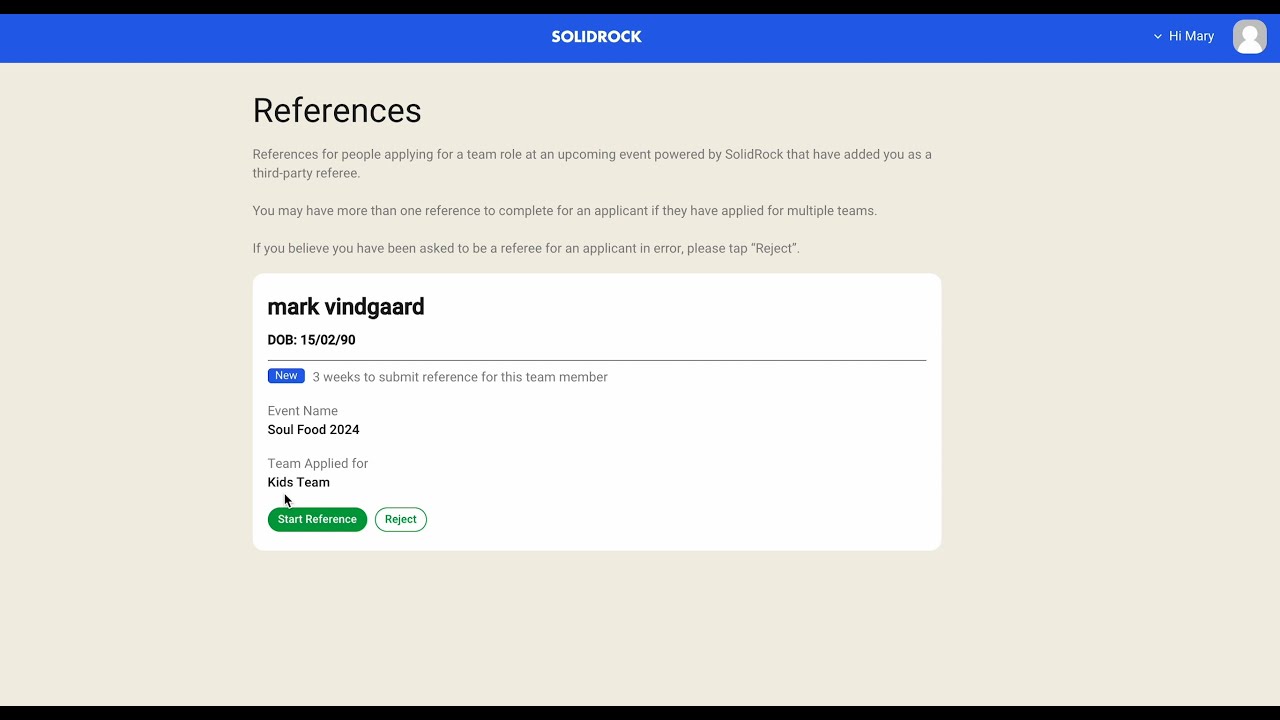
Team Member References
We've introduced a new feature that allows events to capture and review references for team members applying to join a team. Designated referees will receive an email with a link to provide a reference for the applicant.
Check it out in this video
Payment Plan Fee
Events now have the option to charge a fee for using a payment plan. This provides additional flexibility for event organizers.
Automated Cleanup of Front of House Admin Accounts
To enhance data security, we've implemented an automated process that removes Front of House admin roles after an event has concluded.
Custom Event Location Coordinates
Events can now set the exact location of their event for use in the event map, ensuring accuracy even when automated location data is incomplete.
Discrete Check-ins
A new option is available for ticket check-in and out that eliminates the need for a confirmation step, streamlining the process.
Check-in Reset
For venues hosting multiple meetings, we've added the ability to reset the number of checked-in tickets between meetings.
Simplified Payment Plan Cancellation
Canceling a payment plan for an order is now a more straightforward process.
Account Verification Grace Period
Users now have a 48-hour grace period to verify their email address before their account is locked.
Q2 2024
We've been busy over the last few months with a number of updates to improve the event management experience for both event admins and attendees. Here's a summary of what we've been working on:
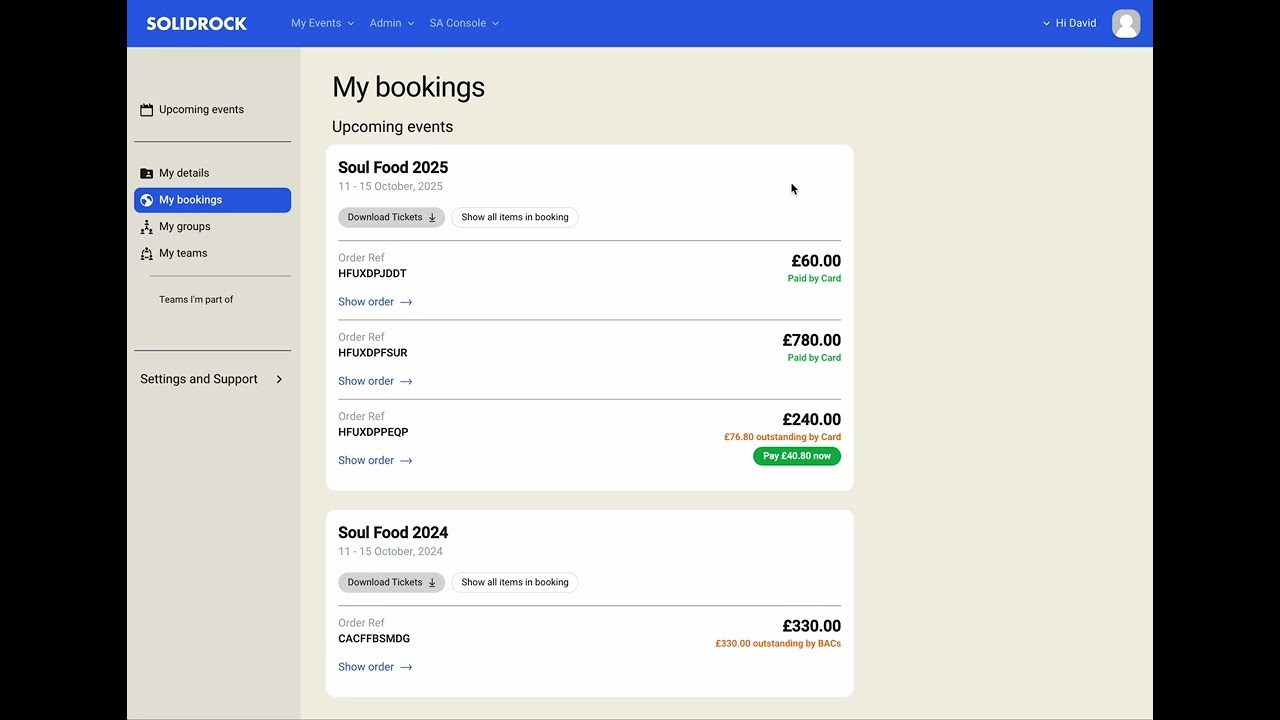
User Profile
We've brought a brand new look and feel for the user profile area making it easier to navigate and find the information customers need. You can now:
- See all your bookings in one place across all relevant events
- Easily access your downloadable digital tickets
- Pay any outstanding balances and instalments on your orders
Watch the video below to see the new profile and 'My Bookings' area in action:
'Remember Me' login
It's the simple things that ooften make the biggest difference and this one is no exception. We've added a 'Remember Me' option to the login page so you can stay logged in for longer without having to re-enter your details.
Q1 2024
We're kicking off the new year with exciting updates to streamline team management, event arrivals and digesting top-level event data.
Enhanced Team Member Approval Criteria
We're excited to announce a significant update to our Approval Criteria feature! Now, you can customize approval requirements for each individual team within your event. This flexibility allows you to tailor your workflow to the specific needs of each team. Key Benefits include:
- Increased Efficiency: Streamline your approval process by setting criteria that align with your team's unique requirements.
- Improved Compliance: Ensure that all team members meet the necessary qualifications before being granted approval.
- Enhanced Customization: Tailor your workflow to the specific needs of each team within your event.
Event Arrivals
- Bulk Arrivals: Arrive entire bookings or groups in one go! This feature is perfect for events with large groups or bookings that need to be checked in quickly.
- Search: Search now takes into account group names and codes
- Accountability: We now record which account was responsible for checking in/out a ticket and assigning an event pass.
Event Dashboard
Each dashboard block now includes a tooltip to priovide context for the data displayed. This is especially useful for new users or those who may not be familiar with the data being presented. We also now provide an alternative 'table' view for data to make at-a-glance analysis easier.
November 2023
The cold and wet ☔ weather hasn't stopped us from continuing to expand and improve Solidrock this month. We've got a number of updates around emails, a new timeout system and much more, alongside some infrastructure updates to give you even better security 🔒 and performance 🏎️.
Time Restricted Items
The biggest feature release this month is the ability to mark certain items as 'Time Restricted'. Time Restricted items will start a 30-minute inactivity timer for a Lead Booker. When the timer runs out, those items will be removed and become available for others to purchase.
The timer is reset back to 30-minutes by staying active in their order by updating ticket and extra details, adding new items to their order and otherwise being active in the booking process.
To read more about time restricted items, take a look at our docs page.
Notifications & Emails
This month we've made a number of changes, and we've added some new emails, to help you manage your event much easier, such as:
- Emails Area: All email settings for your event now have their own area. You can access this from the left-hand navigation. Click
Event Emailsunder theEvent Infosection. - Weekly Sales Summary: This opt-in email will give you a quick summary of the previous weeks sales, new team members and groups registered and a breakdown of how many of each of your tickets and extras were bought. Opt-in from your profile notifications page
- Unpaid Item Expiry Reminder: You can now enable a new email to be sent automatically to any Lead Booker who will have items in their unpaid orders expire within a week.
- Group Coordinator Notification: Group Coordinators can now opt in to a new notification which is sent whenever a new ticket for their group is purchased.
Team Leader Assignment
One of the things we implemented in October was a simpler way to add and remove Group Coordinators within your event. We've expanded on this and have now made managing your Team Leaders just as quick and easy.
Dashboard Updates
We have made a number of updates to the dashboard to make it clearer to get the data you need, including:
- Tickets Chart: We've added a chart to break down each of your tickets, as we have for extras.
- Tooltip Data: Tooltips in the Tickets and Extras charts now show the sales data for each item, broken down by payment status.
- In Progress Colour: We've updated the colour of In Progress data to cyan to differentiate it from Pending data.
October 2023
With Autumn now here and bookings for next year's events starting, we've got some exciting updates with Custom Forms, Groups, and more. Of course, we've also been continuing to squash pesky bugs 🐛 and improve overall system performance 🏎️.
Custom Forms
We've given Custom Forms a number of functional updates to make them more powerful and flexible, such as:
- Previews: Form previews have been given a refresh! Now you can see exactly what your Lead Bookers see within the preview for both Delegate and Team Member ticket types.
- Custom Labels and Instructions: This allows you to use the same underlying custom fields but tweak the name (label) and field instructions within each form, to better fit the use case of that form. Want 'First Name' to read 'Delegate First Name' instead? No problem!
- Hidden Fields: You can now hide certain fields from Lead Bookers but still have them accessible within the event's Admin Console. This is great for fields that are time-sensitive and not applicable year-round, or for 'Office Use Only' fields.
Groups
Continuing on from our May updates around groups, we've added some extra functionality to make it easier to manage Groups within your event. These include:
- Over 18s Check: A new event setting that allows you to display an over-18s check on the Public Group Registration form.
- Importing Group Coordinators: From the Group Coordinators list, you can now import Group Coordinators from any other event using the same Group Set.
- Adding Group Coordinators: You can now easily add a Group Coordinator to any existing group from the event's Group List page.
- Removing Group Coordinators: You can now easily remove a Group Coordinator from the Group Coordinators page.
Notifications
We've added a new opt-in notification to alert you whenever a new group has been publicly registered. There is also an updated UI for the notifications area, to make it easier to manage which notifications you've opted into for each of your events.
May 2023
As Spring rolls into Summer we've got a host of updates rolling out including a major refactor of how groups are managed, improvements to Payment Plans and instalments and some refinements to the booking process UI.
Groups
With this update, groups have been revamped to remove complexity and head-scratching moments. Say hello to Groups v2.0 now with:
- Configuration: Event admins now configure if and how an event uses groups from the event settings page
- Bookings: When event settings require it, Lead Bookers will now be asked to register or assign a group to their booking as a first step which will automatically assign the chosen group to any tickets or extras then added to their booking.
- Forms/Fields: Group Select fields are a thing of the past! Groups are no longer managed within custom form fields but are now assigned and managed from ticket lists and booking summary tables. You can now finally batch-update tickets and extras to a different group in just a couple of clicks 🙌 🎉
- Reports: The old
Group Ticketsreport has been renamed toGroupsand now includes details of all extras that have been associated to a group as well. - Group Entry Pages: These now list the tickets and extras assigned to a group. In addition, the page will provide details on all Group Coordinators.
Payment Plans
Since their launch in Summer 2022, Payment Plans have become increasingly popular. One common request from our event partners has been the ability for events to require a Lead Booker to accept specific payment terms and conditions when using a payment plan, including agreeing to the line of credit offered by the event. These payment-specific terms are recorded and can be viewed on the order page within the backend, similar to order-level terms and conditions.
If an instalment payment fails when paid by card or set for automatic collection, Solidrock will send an email notification to the Lead Booker with a link to pay the instalment. Previously, some users were unsure where to navigate to pay the instalment after logging in to their account. However, now whenever an instalment is overdue, a notification will appear on-screen with a link to pay or update card details to ensure timely payment.
Booking Process UI
The main booking process a Lead Booker would navigate through has been updated to bring refinements to colours, text sizes and iconography as well as to provide easier access to their account profile, bookings and groups.
The event landing page now includes a table listing the available tickets and prices, meaning people can access and digest this important information without having to register a Solidrock account first.
February 2023
This update brings a ton of little refinements across the platform to Payment Instalments, form validation errors & UI, Groups and automated Event Emails.
Oh, and did we mention we squashed over 40 bugs too!?
Groups
When groups are created, either by an event admin or registered by a Lead Booker, they are given a unique, random group code. Event Admins now have the ability to change this code to be something a little less random and a little more memorable!
Event Emails
They've been a little while coming, but we are finally ready to release two new automated emails that can be enabled per event.
Unassigned Tickets Reminder: This email is sent to all Lead Bookers who have a booking with tickets that are still missing required form information (e.g. DOB, Dietary Requirements, etc.) 1 week before the order editing cut-off date. This is especially useful if the event is set up to allow Group Coordinators or anybody to complete a booking without first providing this information.
Digital Tickets: Until now a Lead Booker needed to log in to their Solidrock profile to download their tickets. This email simplifies the process significantly by emailing the tickets to them at an appropriate date specified by the event admins using the
Digital Ticket Delivery Datefield.
NOTE
Any booking that is completed and paid for after the Digital Ticket Delivery Date will have their tickets emailed immediately.
October 2022
Group Management
Alongside all the usual bug fixing and performance tuning we made managing groups simpler at the event level in this update. By creating two new areas in the main event navigation for viewing the 'Group List' and 'Group Coordinators' it is easier than ever to see which groups are attending an event and to access to key contact details for the group coordinators.
FAQs
Based on conversations we have with our incredible event administrators we compiled an initial set of FAQs which we'll be adding to over time.
Event Ticket Limit
There is now a new Ticket Limit option within an event's settings which acts as a hard limit across all ticket options. When that limit is reached no further tickets can be booked.
July 2022
In this update we've only gone and ticked off one of the most requested features - Payment Plans! Not to mention a plethora of bug fixes, updates to the whole backend look and feel as well as wristband assignment and scanning. If it's been a bit quiet around here lately, now you know why!
Payment Plans
Want to offer the option to your customers to pay a deposit and subsequent weekly or monthly instalments for their order? Now you can! Deposit amount and number of instalments are completely customisable. You can even offer multiple payment plans to the customer for them to choose the most appropriate option for them.
Orders can of course always be paid in full at checkout by card or, in certain circumstances, by BACs (Bank Transfer) too. Payment plans build on these payment methods allowing you the option to attempt automatic collection of an instalment where a customer is paying by card. Where this isn't possible (if the customer is paying instalments by BACs) or fails (e.g. the saved card on record has since expired) then an instalment payment instruction is sent directing the customer on how to pay the scheduled instalment either by making another bank transfer, or by logging into their Solidrock profile and paying by card.
Wristband Assignment
With in-person events now a real thing again (🙏🏻 Hopefully we've said goodbye to COVID restrictions for good 🙏🏻) we've spent some time refining and updating the delegate arrivals and check-in experience as well as bring the Box Office out of beta! We've brought all these features under one roof we're calling 'Front of House'.
With these updates we now also offer support for USB and Bluetooth HID barcode scanners and, now that we've revamped the check in and out process allowing multiple records per ticket, we've set up a new 'Check In' report, so you can pull out this detail.
If your event uses wristbands, or any other uniquely identifiable ID pass on-site you can now assign these to tickets within Solidrock either by entering the unique ID of the band or pass, or by scanning a QR Code or Barcode. Wristbands can be assigned ahead of the event, during check-in or through the box-office.
Once assigned, a search can be performed on a wristband ID or a QR/Barcode scanned to pull up the associated ticket details.
Design updates for the backend
We've been busy bringing some visual updates to the backend, unifying the design and pages throughout. But it doesn't stop there, we've also refined search and filtering across the board and brought in tons of enhancements here and there. We can't wait for you to see them.
February 2022
This update primarily focussed on improvements to the underlying hosting infrastructure to increase performance of the system under heavier loads. There was also a healthy amount of 🐛 squashing and some quality of life improvements tucked away for event organisers.
Archiving old events
Tidy up your event lists by archiving old, past events!
TIP
From the event list page in the backend open up the event options menu (by clicking on the cog) and selecting 'Archive' from the list of options.
Archived event data is still fully accessible and is now accessed from a more discrete list on the same event list page. Archived events do not show in the 'My Events' navigation.
Extras Chart
For events that sell extras, we've added a new chart to event dashboards to provide at a glance statistics on the number of extras sold, indicating the number that are full paid, and those in Pending (BACs) orders.
Quick link to documentation & guide
In the event sidebar navigation you'll now find a new link to this documentation site where we'll host guides, tutorials, FAQs and release notes!
Previous Releases
Solidrock Booking System is under constant development. Some worthy mentions for recent improvements include:
Event Check-in
From the event sidebar navigation you can access the check-in link that will load up the event arrivals and check-in pages. From here you can either scan a ticket's QR code to check in an individual ticket or search for and entire order by entering the unique order reference to then check-in one or more tickets.
TIP
Checked-in tickets will be indicated as such within the backend event ticket list by a visual ✓ symbol.
The Ticket List report also provides a new 'Checked in Date' column showing the date and time a ticket was checked in to the event.